Creating presentations from a large batch of images can be an incredibly tedious task. Whether you are compiling a digital photo album, preparing a visual pitch deck, or organizing educational flashcards, manually inserting pictures one by one is simply inefficient. Fortunately, technology has evolved to eliminate this repetitive chore. By utilizing an instant photo slideshow maker, you can automate the entire process in just a few clicks. Consequently, you save valuable time and energy that can be better spent on refining your actual presentation delivery.
In today's fast-paced digital environment, efficiency is everything. Professionals and creatives alike cannot afford to waste hours formatting slides, resizing images, and aligning visual elements. Therefore, an automated solution that directly transforms your image files into a structured PowerPoint file is a game-changer. Throughout this comprehensive guide, we will explore exactly how these tools work, why they are essential for modern workflows, and how you can leverage them to create stunning visual decks effortlessly.

What is an Instant Photo Slideshow Maker?
An instant photo slideshow maker is a specialized software or web-based application designed to compile multiple image files into a single, cohesive presentation file. Instead of opening a presentation program and manually adding new slides for every single picture, this tool handles the heavy lifting for you. It programmatically generates a PowerPoint (PPTX) file where each uploaded image is perfectly placed onto its own individual slide.
Furthermore, these tools operate by reading the binary data of your images—such as JPGs or PNGs—and packaging them into the Office Open XML standard used by modern presentation software. This means the resulting file is universally compatible with Microsoft PowerPoint, Google Slides, Apple Keynote, and various other presentation platforms. As a result, you get a native, editable presentation file without having to write a single line of code or perform repetitive formatting tasks.
In addition to basic compilation, advanced converters offer intuitive features like drag-and-drop reordering. This allows users to visually arrange their photos in the exact sequence they desire before the final file is generated. Ultimately, it bridges the gap between a disorganized folder of raw images and a polished, ready-to-present slideshow deck.
Why you may need this
There are countless scenarios where batch converting images into a presentation format is not just helpful, but absolutely necessary. Different industries and personal projects require rapid visual organization. Below are some of the most common reasons you might need to utilize an automated image-to-presentation tool.
Business and Real Estate
For business professionals, time is money. Real estate agents, for example, often need to showcase dozens of property photos to potential buyers. Manually dragging these photos into a slideshow is a poor use of their time. By using an automated converter, an agent can instantly turn a folder of property snapshots into a professional pitch deck. Similarly, sales teams can rapidly generate product catalogs from inventory images to present to clients during meetings.
Photography and Creative Portfolios
Photographers frequently need to present their work to clients in a structured format. Whether it is a wedding album proof or a commercial photography portfolio, delivering a clean PPTX file allows clients to view the images sequentially and even add comments to specific slides. For instance, if you are working with legacy image formats in a professional setting, you might first need to convert TIFF to TIF before compiling your final presentation deck to ensure maximum compatibility.
Education and Training
Teachers and corporate trainers rely heavily on visual aids. Educators often create flashcards, historical photo timelines, or diagram reviews for their students. An automated tool allows a teacher to take a folder of downloaded educational diagrams and instantly generate a classroom-ready slideshow. Consequently, this frees up the educator's schedule, allowing them to focus on lesson planning rather than software formatting.
Personal Use and Event Planning
On a personal level, compiling photos for a family reunion, a wedding reception, or a memorial service can be emotionally taxing and time-consuming. An automated converter allows organizers to quickly gather photos from multiple family members and instantly generate a beautiful, sequential slideshow that can be projected on a large screen during the event.

Ways to do it
When it comes to turning a collection of photos into a presentation deck, you have a few different avenues to explore. Each method has its own set of pros and cons, depending on your technical expertise and the tools you have at your disposal.
The Manual Method
The most traditional way is the manual method. This involves opening your presentation software, creating a blank slide, clicking "Insert Image," browsing for your file, resizing it to fit the canvas, and then repeating the process for every single photo. However, this method is highly inefficient. If you have fifty or a hundred images, this repetitive process can easily consume hours of your day. Therefore, it is generally not recommended for anything more than a handful of pictures.
Native Software Features
Another option is to use built-in features within desktop applications. For example, Microsoft PowerPoint has a built-in Photo Album feature. This allows you to select multiple images from your hard drive and import them into a new presentation. While this is significantly faster than the manual method, it requires you to have a paid desktop version of the software installed. Furthermore, it can sometimes be clunky when it comes to reordering images or dealing with mixed aspect ratios.
Online Web-Based Converters
The most modern and accessible way to accomplish this task is by using a dedicated online web application. These cloud-based tools require no software installation and can be accessed from any device, including tablets and smartphones. You simply upload your images to the browser, arrange them, and download the finished file. Presentations often go hand-in-hand with video content. If you are preparing multimedia files alongside your slideshow, you might also find yourself converting WebM to MKV to ensure seamless playback across different media players used during your presentation.
Step-by-Step Guide for using our tool
Using a dedicated online converter is designed to be incredibly intuitive. Even if you have no technical background, you can generate a professional slideshow in a matter of minutes. Here is a clear, step-by-step guide to help you navigate the process smoothly.
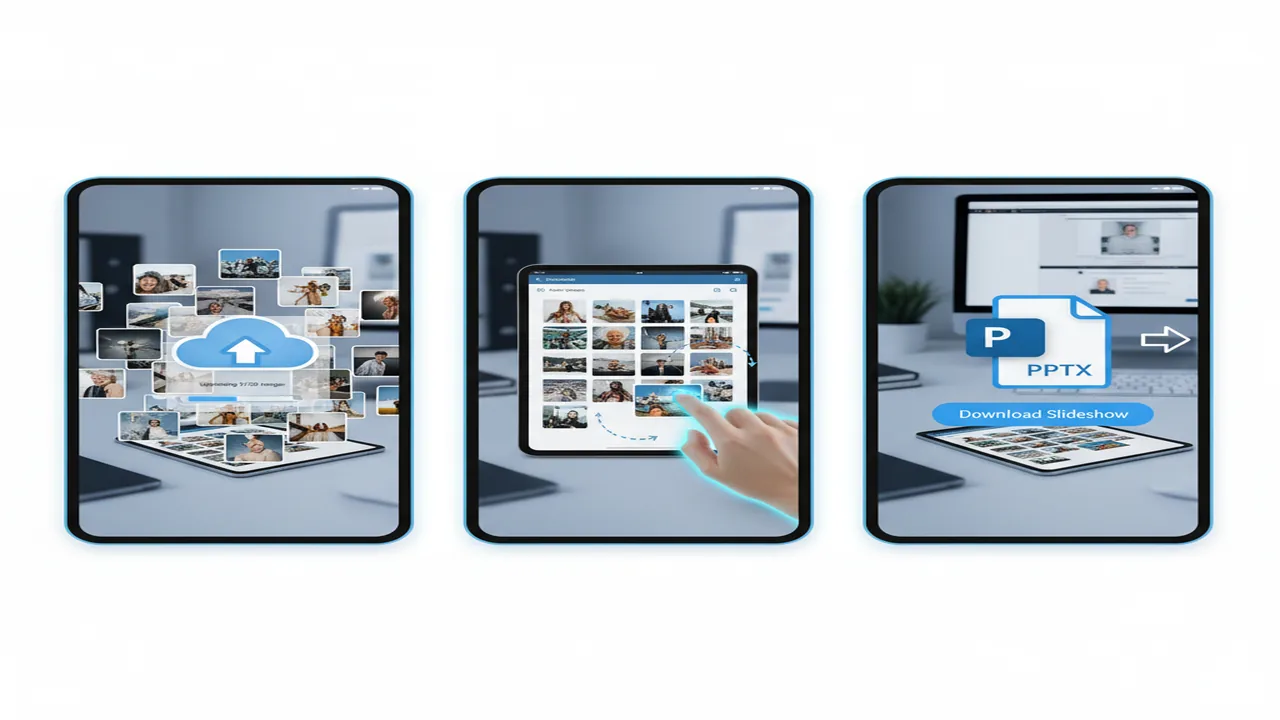
- Step 1: Gather and Prepare Your Images. First, collect all the photos you want to include in your presentation and place them into a single folder on your computer. Ensure they are in a supported format, such as JPG or PNG.
- Step 2: Upload to the Platform. Navigate to the conversion tool in your web browser. Click the upload button or simply drag and drop your entire selection of images directly into the designated area on the screen.
- Step 3: Reorder Your Slides. Once uploaded, the tool will display thumbnail previews of your images. At this stage, you can easily click and drag these thumbnails to rearrange their order. This ensures your presentation flows exactly how you want it to.
- Step 4: Initiate the Conversion. After you are satisfied with the sequence, click the "Convert" or "Generate PPTX" button. The cloud servers will instantly process your request, placing each image onto a perfectly sized slide.
- Step 5: Download and Present. Finally, a download link will appear. Click it to save the newly created PPTX file to your device. You can now open this file in your preferred presentation software, make any final text additions, and start presenting.
Common Mistakes to avoid
While automated tools make the compilation process incredibly easy, there are still a few pitfalls that users frequently encounter. By being aware of these common mistakes, you can ensure your final presentation looks polished and professional.
Ignoring Image Aspect Ratios
One of the most frequent mistakes is mixing images with wildly different aspect ratios. If you combine tall, vertical smartphone photos with wide, panoramic landscape shots, the resulting presentation may look inconsistent. The software will center the images, but the varying blank spaces (letterboxing or pillarboxing) can be distracting. Whenever possible, try to crop your images to a uniform ratio, such as 16:9, before uploading them to the converter.
Uploading Unoptimized or Massive Files
Another common error is uploading massive, high-resolution print files directly into the converter. While the tool can handle them, it will result in a bloated PPTX file that is difficult to email or share. It is highly recommended to compress your images slightly before conversion. Photographers dealing with raw image data often have strict format requirements. For example, adjusting your workflow by converting WebP to DNG can help preserve image data before you eventually export web-friendly, optimized JPGs for your final slideshow.
Forgetting to Reorder Before Converting
Many users rush through the process and click the convert button immediately after uploading. Consequently, the slides are generated in the alphabetical or chronological order of the original files. Always take a moment to utilize the drag-and-drop interface to visually sequence your story. Fixing the order in the web tool is much faster than dragging slides around within the heavy desktop presentation software later.
Best tool to solve this problem
When it comes to finding the most reliable and efficient solution, you need a platform that prioritizes speed, privacy, and ease of use. The absolute best way to handle this workflow is to batch convert photos to PowerPoint online using a dedicated, purpose-built utility.
This specific tool stands out because it is entirely web-based, meaning you never have to download bulky software or worry about operating system compatibility. It seamlessly supports popular formats like JPG and PNG, ensuring your photos retain their quality during the transition. Furthermore, the intuitive drag-and-drop interface empowers you to sequence your visual narrative effortlessly.
Security is also a top priority. When using designer-tools.app, your files are processed securely and are never stored permanently on the servers, guaranteeing that your personal or proprietary business images remain strictly confidential. Ultimately, it provides a frictionless experience that transforms hours of tedious formatting into a task that takes mere seconds.
Conclusion
In summary, manually compiling photos into a presentation is an outdated and inefficient practice. Whether you are a real estate agent showcasing properties, a teacher building visual curriculum, or simply someone putting together a family photo album, automation is the key to a stress-free workflow. By utilizing a dedicated image-to-presentation converter, you can instantly transform a chaotic folder of pictures into a highly organized, professional deck.
Remember to prepare your images properly, maintain consistent aspect ratios, and take advantage of visual reordering features before generating your final file. By adopting these modern digital tools into your daily routine, you will reclaim countless hours of your time, allowing you to focus on what truly matters: delivering an engaging and impactful presentation to your audience.
FAQ
Can I reorder my images before creating the PPTX file?
Yes, absolutely. A high-quality conversion tool provides a visual interface where you can see thumbnail previews of all your uploaded images. Before you initiate the final conversion process, you can simply click and drag these thumbnails into your preferred sequence. This ensures that when the PowerPoint file is generated, your slides will appear in the exact chronological or thematic order that you specifically designed.
What image file formats are supported by the converter?
Most modern instant photo slideshow makers support the most widely used web and digital photography formats. This primarily includes standard JPG (or JPEG) and PNG files. These formats offer the best balance of image quality and file size, making them ideal for presentations. If you have images in raw formats or highly specialized formats like TIFF or WebP, it is highly recommended to convert them to standard JPGs or PNGs before uploading them to the presentation maker.
Is my data secure when using an online image converter?
Yes, security and privacy are paramount. Reputable online conversion tools utilize secure, encrypted connections (HTTPS) to transfer your files. Furthermore, the processing is done automatically by servers without human intervention. Once your presentation is generated and downloaded, the original image files and the resulting PPTX file are typically purged from the server's memory within a short timeframe, ensuring your private photos or confidential business documents are not stored or shared.
Will the tool stretch or distort my images to fit the slides?
No, a well-designed converter will never stretch or distort your original images. Instead, the tool calculates the dimensions of your photo and scales it proportionally so that it fits within the bounds of the standard presentation slide (usually a 16:9 widescreen format). If your image is a different aspect ratio than the slide, the tool will center the image and leave blank space (usually white or black borders) around the edges, preserving the original look and quality of your photography.
Do I need to install Microsoft PowerPoint to use this online tool?
No, you do not need to have Microsoft PowerPoint installed on your computer to use the online conversion tool itself. The web application operates entirely in your internet browser. However, once the tool generates and downloads the final PPTX file to your device, you will need a compatible presentation program to open, view, and present it. This can be Microsoft PowerPoint, but you can also use free alternatives like Google Slides, Apple Keynote, or LibreOffice Impress.